읽는 법How to read
1
2
3
4
5~
막대가 하나씩 늘어 #이 완성됩니다. 데스크탑이 5개를 넘으면 주황색 #이 뜹니다.
One bar per desktop until the # is complete. Five or more? You get an orange #.
조용히, 구석에서Quiet, in the corner
- 모든 데스크탑과 전체화면 앱 위에 늘 보입니다.Always visible, on every desktop and over full-screen apps.
- 메뉴 막대나 Dock에 아이콘을 늘리지 않습니다.No extra icon in the menu bar or the Dock.
- 구석의 #을 누르면 설정과 종료 메뉴가 열립니다.Click the # for Settings and Quit.
설정Settings
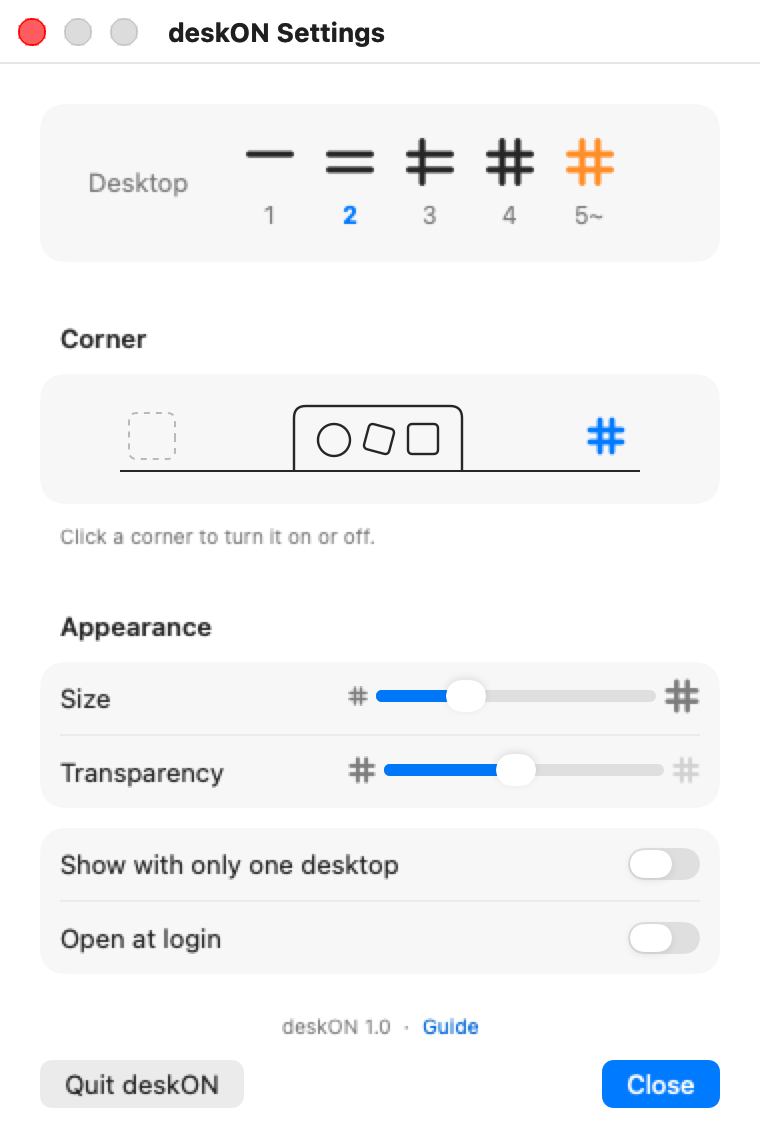
- Desktop 지금 데스크탑 번호가 파랗게 표시됩니다.Your current desktop is shown in blue.
- Corner 왼쪽·오른쪽 구석을 눌러 켜고 끕니다. 둘 다 켤 수도 있습니다.Click a corner to turn it on or off, or use both.
- Size · Transparency 곁눈질로 보일 만큼만 맞춥니다.Just enough to catch from the corner of your eye.
- Open at login 맥을 켤 때 함께 켜집니다.Starts with your Mac.
다운로드Download
deskON 1.0 받기 · DownloaddeskON-1.0.dmg · 0.5 MB
무료 · macOS 13 이상 · Apple 실리콘과 Intel 맥 모두
Free · macOS 13 or later · Apple silicon and Intel
처음 열 때First launch
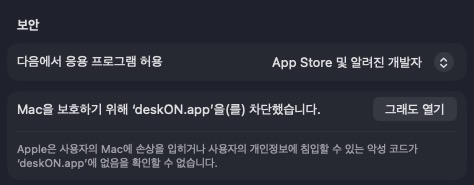
Apple 서명이 없는 무료 앱이라 처음 한 번은 맥이 막습니다.
deskON is free and unsigned, so your Mac blocks it once.
시스템 설정 → 개인정보 보호 및 보안에서 그래도 열기를 누르면 됩니다.
System Settings → Privacy & Security, then click Open Anyway.